🚗 Route Tikoai — 路線規劃小工具 功能總覽
🚗 Route Tikoai — Feature Guide
一頁看懂全部功能:多點路線 → 時刻推算 → 智慧建議 → 匯出分享。打開 route.tikoai.com 邊看邊試。
Everything in one page: multi-stop routing → time chains → smart suggestions → export & share. Open route.tikoai.com and try along.
→ 開始使用 / Open the tool🧭 1. 多點路線規劃(核心)
🧭 1. Multi-stop route planning (core)
- A 點出發:在「A 點出發日期與時間」下方輸入地址(有自動完成建議,選了直接帶入完整地址),按 📍 定位——地圖會定位但不會放大到底,保留周邊視野。
- Start at A: type an address under the departure time (autocomplete built in; picking one fills the full address), press 📍 to locate — the map keeps surrounding context instead of zooming all the way in.
- ➕ 加下一站:無限延伸 B、C、D…每站可設停留分鐘、寫備註(見誰、做什麼)。抵達/出發時間全鏈自動推算。
- ➕ Add next stop: extend B, C, D… endlessly. Each stop has a stay duration and note (who you meet, what you do). Arrival/departure times chain automatically.
- 拖曳排序:按住任一站上下拖動即重排,時間鏈即時重算;「⚡ 站序最佳化」用最近鄰居+2-opt 演算法自動排最短路線,並報告省下多少距離與時間。
- Drag to reorder: drag any stop to re-sequence; times recalc instantly. "⚡ Optimize order" uses nearest-neighbor + 2-opt to shorten the route and reports the savings.
- 回到 A:一鍵加回程並推算回程時刻;可隨時取消繼續加站。
- Return to A: one click adds the return leg with its times; cancel anytime to keep adding stops.
- 🗺 地圖互動:點地圖任意處=地點卡(店名+地址,➕ 直接加站、⭐ 收藏、🔎 附近 500 公尺同類店家);右鍵/手機長按 0.6 秒=快速選單。
- 🗺 Map interaction: click anywhere = place card (store name + address; ➕ add as stop, ⭐ favorite, 🔎 nearby within 500 m); right-click / long-press 0.6 s = quick menu.
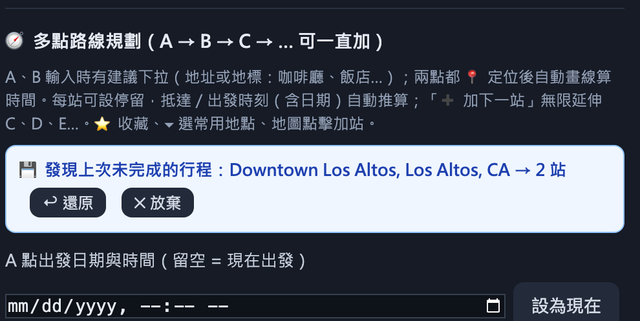
多點路線規劃實際畫面:A 卡+B/C 站卡+時間鏈(點圖放大)
Actual planning panel: A card + stops + time chain (click to enlarge)
⭐ 2. 常用地點與收藏匣
⭐ 2. Favorites & inbox
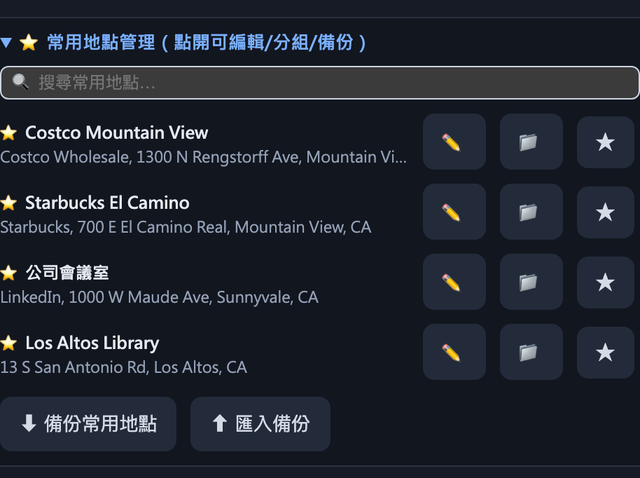
- 地點卡或輸入框旁的 ⭐ 可收藏地點(以店名顯示、地址為輔);下拉選單分組顯示、可勾選多筆一次加入行程。
- ⭐ on a place card or input saves a favorite (shown by store name, address as secondary); grouped dropdown, multi-select to add many at once.
- 🧿 收藏匣:在 Redfin / Zillow 房屋頁按書籤(Bookmarklet),地址自動進入收藏匣——「🏠 看房模式」一鍵加入全部、每站停 15 分、自動回 A。
- 🧿 Inbox: press the bookmarklet on a Redfin / Zillow listing and the address lands here — "🏠 Open-house mode" adds all stops, 15-min stay each, auto return to A.
- 管理介面支援改名、分組、備註(Open House 時間/價格)、搜尋過濾、匯入匯出備份。
- Manage: rename, groups, notes (open-house time / price), search filter, import/export backup.
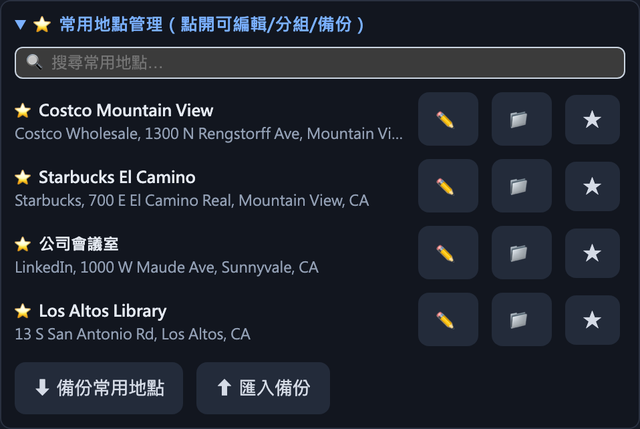
常用地點管理(分組/改名/備份)(點圖放大)
Favorites manager (groups / rename / backup) (click to enlarge)
⏱ 3. 停留時間智慧預設
⏱ 3. Smart stay-time defaults
- 依場地類型自動帶入停留時間(咖啡廳 45 分、會議 90 分、餐廳 60 分…可改、可新增自訂類型)。
- Stay time auto-filled by venue type (café 45 min, meeting 90, restaurant 60… all editable; add your own types).
- 🎓 學習機制:測試比對框比對不到時手動指定一次類型,同名店以後自動套用;已學習清單可查看/刪除。
- 🎓 Learning: when nothing matches, assign a type once and same-name stores auto-apply it from then on; learned list is viewable / clearable.
- 地點卡加站前就顯示「將帶入停留 X 分(來源:學習/類型/整體預設)」。
- The place card previews "will apply X-min stay (source: learned / type / overall)" before you add.
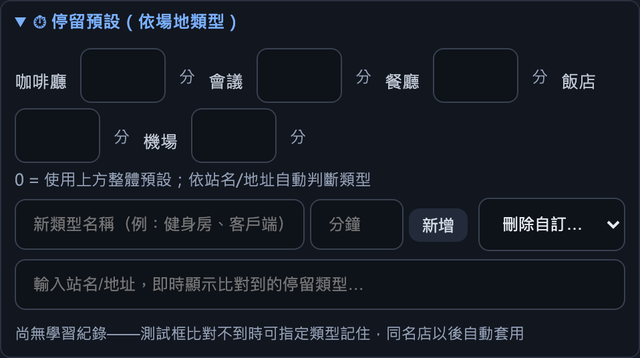
停留預設:依場地類型自動帶入分鐘數(點圖放大)
Stay defaults by venue type (click to enlarge)
🕐 4. 出發時間模擬(避開尖峰)
🕐 4. Departure-time simulation (beat the rush)
- 按「🕐 出發時間模擬」→ 0–23 點每小時出發的預計全程時間長條圖:最快時段綠色、目前所選深藍高亮。
- Press "🕐 Departure-time simulation" → a bar chart of total trip time for each departure hour 0–23: fastest hour in green, current choice highlighted blue.
- 工作日/週末切換:比較兩種日型的尖峰差異(Google 模式取樣真實 BEST_GUESS 路況;免費模式用歷史尖峰模型、零 API)。
- Weekday / weekend toggle: compare rush patterns per day type (Google mode samples real BEST_GUESS traffic; free mode uses the rush model with zero API).
- ⚡ 避開尖峰建議:自動找出離目前最近、省 ≥10% 的時段;不想改時間?🏢 改站序建議告訴你調整站序能省多少。
- ⚡ Beat-the-rush tip: finds the nearest hour saving ≥10%. Don't want to shift time? The 🏢 reorder tip estimates savings from re-sequencing stops instead.
- 點任一長條=套用該出發時間(整條時刻鏈平移)。
- Click any bar to apply that departure time (the whole time chain shifts).
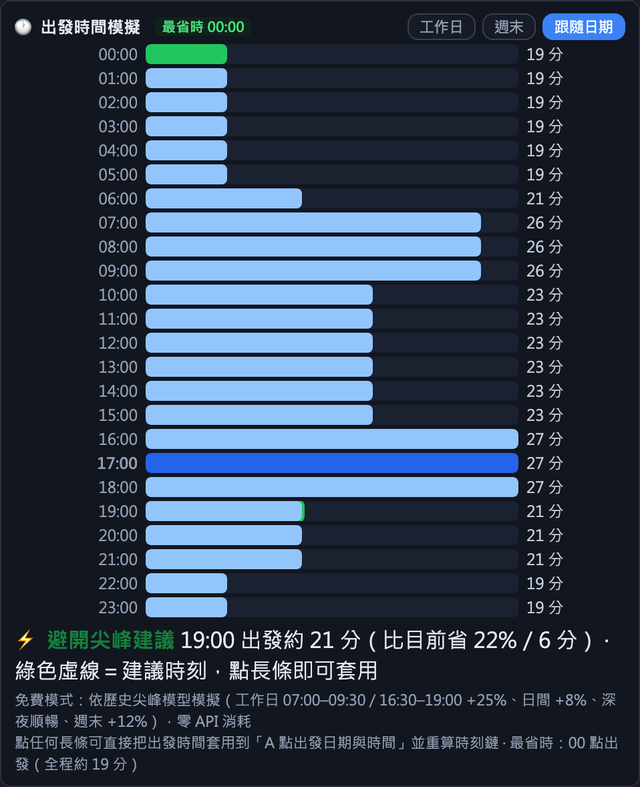
24 小時出發模擬長條圖(綠色=最省時)(點圖放大)
24-hour departure simulation bars (green = fastest) (click to enlarge)
🧳 5. 行程清單(9999 筆)
🧳 5. Trip list (9,999 entries)
- 「➕ 加入目前行程」把整條路線存進清單(綠色關鍵按鈕);可改名、標籤、拖曳排序、日期搜尋、載入副本再編輯、單筆/勾選批次/全部操作。
- "➕ Add to trip list" stores the whole route (the green key button); rename, tag, drag-sort, date search, load a copy to edit, single / batch / all operations.
- 每筆顯示 🕐 最省時時段(跑過模擬後自動記住,載入免重算);「省時潛力」排序把最該改出發時間的路線排最前(每筆標 −N 分)。
- Each entry shows its 🕐 fastest hour (remembered after one simulation; loaded without re-calc); sort by "Time-saving" surfaces trips most worth rescheduling (−N min per row).
- 🔁 重複產生:勾選行程每週/雙週/每月複製並平移日期(固定巡迴一次設定全年)。
- 🔁 Recurring copy: duplicate checked trips weekly / biweekly / monthly with shifted dates (set a year of recurring routes at once).
- 改出發時間後可「⏱ 同步此筆出發時間」,整條時刻整體平移。
- Changed the departure? "⏱ Sync this trip's departure" shifts the whole chain.
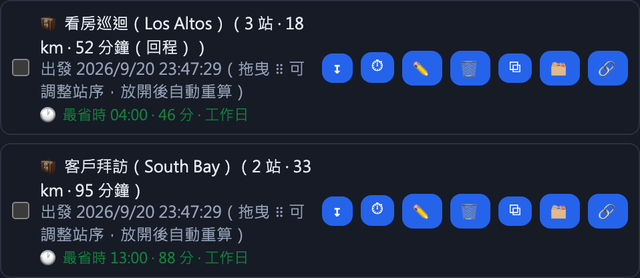
行程清單:勾選匯出、省時潛力排序(點圖放大)
Trip list: check-to-export, time-saving sort (click to enlarge)
📤 6. 匯出(CSV / Markdown / iCal)
📤 6. Export (CSV / Markdown / iCal)
- CSV(Excel 可開)每列:出發日期時間 → 出發地 → 抵達日期時間 → 抵達地 → 距離(美加自動英里/台灣公里)→ 時間 → 日型(工作日/週末) → 緩衝 → 停留 → 備註。欄位可勾選隱藏。
- CSV (Excel-ready) rows: departure date & time → origin → arrival date & time → destination → distance (mi in US/CA, km in TW) → time → day type (weekday/weekend) → buffer → stay → notes. Columns are toggleable.
- Markdown:總覽表+分段明細雙表格,同一份檔案可持續疊加每條新行程。
- Markdown: overview table + leg details; keep appending every new trip to the same file.
- iCal (.ics):每站變成有日期時間與地點的行事曆事件(可直接匯入 Google Calendar);「全天事件模式」每天彙整一則;「⏱ 交通緩衝」0–180 分加進每段車程(.ics/CSV/Markdown 同步生效)。
- iCal (.ics): each stop becomes a calendar event with date-time + location (imports straight into Google Calendar); "All-day mode" summarizes one event per day; "⏱ Travel buffer" 0–180 min pads every leg (applies to .ics / CSV / Markdown alike).
- 匯出語言可選中文/英文;CSV 亦可匯入還原行程清單。
- Export in Chinese or English; CSV can also be imported back to restore the trip list.
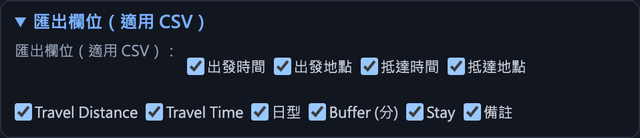
匯出欄位可勾選(隱藏不需要的欄)(點圖放大)
Export column picker (click to enlarge)
🔗 7. 分享唯讀頁
🔗 7. Read-only share page
- 行程清單每筆「🔗 分享」→ 產生 route.tikoai.com/share.html#… 連結(LZ 壓縮,多站也貼得進 LINE/簡訊)。收件人免載入工具、免金鑰即可看時刻表、地圖連結、QR Code。
- "🔗 Share" on any trip → a route.tikoai.com/share.html#… link (LZ-compressed, fits LINE/SMS even for many stops). Recipients need no tool and no API key — timeline, map links, QR code all included.
- 📅 加入 Google 日曆按鈕、緩衝/全天切換、收件人可標記每站「已確認/想去/不去」並回傳 RSVP 連結。
- 📅 Add to Google Calendar button, buffer / all-day toggles, and per-stop RSVP (going / maybe / skip) with a reply link back to the owner.
- 「📥 在完整工具中開啟」讓收件人一鍵載入可編輯副本;貼到 LINE/Slack 顯示 OG 預覽卡。
- "📥 Open in the full tool" loads an editable copy for the recipient; links pasted into LINE / Slack show an OG preview card.
收藏匣(Redfin/Zillow 一鍵送地址進來)(點圖放大)
Inbox (one-click addresses from Redfin/Zillow) (click to enlarge)
💾 8. 資料安全:雲端同步+完整備份
💾 8. Data safety: cloud sync + full backup
- ☁ 雲端同步:設定同步碼(4–24 碼)後,加入行程/收藏/存草稿自動上傳;任何裝置輸入同一同步碼即還原全部資料。保留最近 5 個版本可還原。
- ☁ Cloud sync: set a sync code (4–24 chars) and trips / favorites / drafts upload automatically; enter the same code on any device to restore everything. Last 5 versions kept.
- 📦 完整備份 JSON:草稿+行程表+歷史+常用地點+設定+主題+預設視角,一鍵匯出/匯入換裝置一次帶走。
- 📦 Full backup JSON: drafts + trips + history + favorites + settings + theme + default view — one click to move devices.
- 行程草稿多份暫存、可命名切換、可分享;未按「加入」前也有未存提醒列。
- Multiple named draft slots, shareable; an unsaved-trip bar reminds you before "Add".
雲端同步:同步碼跨裝置+版本快照(點圖放大)
Cloud sync: code across devices + version snapshots (click to enlarge)
🔑 9. Google 模式與額度省著用
🔑 9. Google mode & quota discipline
- 無金鑰=免費模式(OSM + OSRM + Nominatim,零額度);貼上 Google 金鑰即升級Google 模式(原生地圖、即時路況、Places 詳情:營業時間/評分/電話)。
- No key = free mode (OSM + OSRM + Nominatim, zero quota); paste a Google key for Google mode (native map, live traffic, Place details: hours / rating / phone).
- 省額度內建:place_id 快取+Geocoding 24h 快取(同格重點=0)、單次 Nearby 合併、Distance Matrix 批次車程;「💰 額度小抄」看本月實際用量與月底預估。
- Built-in savers: place_id cache + 24h geocode cache (repeat clicks = 0), merged Nearby, batched Distance Matrix; "💰 Quota cheat-sheet" shows this month's real usage and month-end forecast.
- 點擊反查精準度三檔(嚴格/平衡/省額度):放大點擊精準比對店家圖標,不會抓到隔壁店;抓錯可「⚠ 回報」並一鍵重驗。
- Click-lookup accuracy (strict / balanced / free-first): zoomed-in clicks precisely match the venue icon — no more neighbor stores; wrong picks can be "⚠ reported" and re-verified.
- 金鑰請在 Google Cloud Console 設 HTTP referrer 限制(只允許 route.tikoai.com),防盜用計費。
- Set an HTTP referrer restriction in Google Cloud Console (allow route.tikoai.com only) to protect your key.
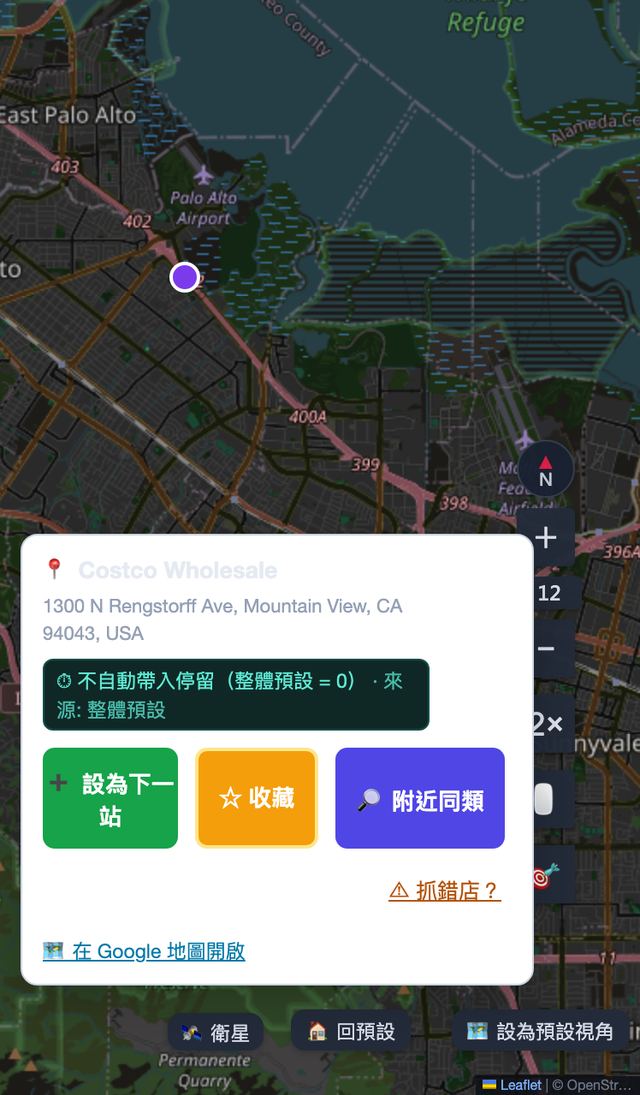
Google 底圖+地點卡(店名反查、附近同類)(點圖放大)
Google basemap + place card (name lookup, nearby) (click to enlarge)
🌙 10. 介面細節
🌙 10. Interface niceties
- 🌙 深色模式:整頁夜間配色+Google 夜間地圖樣式(免費模式反轉瓦片);設定記住並隨備份帶走。
- 🌙 Dark mode: night palette + Google night-map style (inverted tiles in free mode); remembered and carried in backups.
- 中文/EN 一鍵切換;美加地址自動英文、台灣大陸自動中文;距離單位跟隨區域(mi/km)。
- 中文/EN one-click switch; US/CA addresses in English, TW/CN in Chinese; distance unit follows the region (mi/km).
- 🏠 家/公司預設地點、預設視角、地圖角落回預設;鍵盤快速鍵:Enter 定位/重算、Ctrl+S 收藏、Ctrl+E 匯出。
- 🏠 Home / Work presets, default view, one-click go-home; hotkeys: Enter locate/recalc, Ctrl+S favorite, Ctrl+E export.
- 手機友善:地點卡變底部抽屜(上滑看附近、下滑關閉)、長按快速選單、觸控目標全部加大。
- Mobile-friendly: place card becomes a bottom sheet (swipe up = nearby, down = close), long-press quick menu, enlarged touch targets.
- 隱私:新訪客預設起點是公共地標(Downtown Los Altos),不會帶出任何私人地址。
- Privacy: new visitors default to a public landmark (Downtown Los Altos) — no personal addresses are baked in.
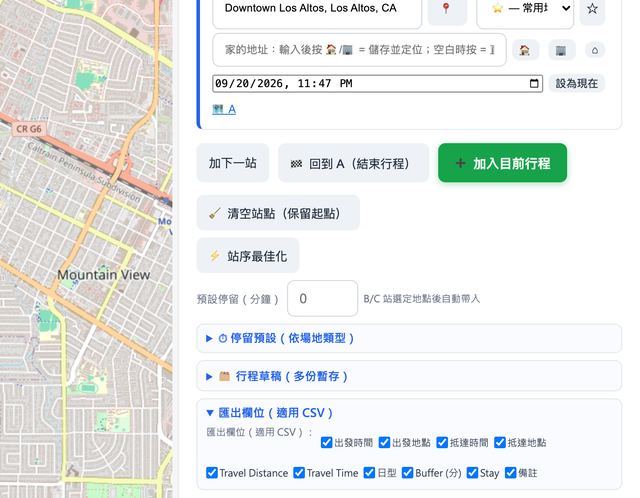
深色模式(夜間護眼,Google 夜間地圖)(點圖放大)
Dark mode (Google night map) (click to enlarge)
🎬 動畫示範(三大關鍵操作)
🎬 Animated demos (three key actions)
① 拖曳排序:B 拖到最後,時間鏈即時重算
① Drag to reorder: B moves to the end, times recalc
B · Costco09:12 → 09:57
C · Sakoon09:57 → 10:08
Σ 全程合計41 分
按住站卡上下拖動 → 後續所有抵達/出發時刻自動重算
Hold a stop card and drag → every later arrival/departure recalculates
② 出發時間模擬:點 12:00 長條 → 套用+時刻鏈平移
② Departure simulation: click the 12:00 bar → applied
✓ 已套用 12:00
✓ Applied 12:00
🕐 出發 09:00 → 12:00,全程 +5 分自動順延dep 09:00 → 12:00, chain shifts +5 min
0–23 點長條圖:綠色=最快時段;點任一長條直接改出發時間
0–23 h bars: green = fastest hour; click any bar to set the departure time
③ 分享唯讀頁:一鍵產生 LZ 壓縮連結
③ Share page: one click → LZ-compressed link
🧳 看房日 A🧳 Open-house day3 站 · 32 分
route.tikoai.com/share.html#d=zSTqkVbYANQTLFuZ…
收件人免載入工具,掃 QR 也行Recipients need no tool — QR works too
✓ 連結已複製
✓ Link copied
行程清單按 🔗 → 連結可直接貼進 LINE/簡訊;貼到 Slack 顯示預覽卡
Press 🔗 on a trip → paste into LINE / SMS; Slack shows a preview card
⌨️ 快速鍵與小技巧
⌨️ Hotkeys & quick tips
| 操作 | 結果 |
|---|---|
| Enter(A/B 欄) | 定位該點並畫線算時間 |
| Enter (A/B box) | Locate and route |
| Enter(站點欄) | 重算該站後續時間鏈 |
| Enter (stop box) | Recalc that stop's chain |
| Ctrl+S | 收藏/取消目前輸入的地點 |
| Ctrl+S | Favorite / unfavorite the typed place |
| Ctrl+E | 匯出(行程=.ics,其他=.md) |
| Ctrl+E | Export (trip = .ics, else .md) |
| 地圖右鍵/長按 | 快速選單:收藏此地點/設為下一站 |
| Right-click / long-press | Quick menu: favorite / set as next stop |
| 雙擊地圖 | 放大一級(350ms 內不會誤開地點卡) |
| Double-click map | Zoom in (won't mis-open the place card) |
💡 建議流程:定位 A → 加站(用建議下拉或地圖點擊)→ 跑一次 🕐 模擬記住最省時段 → ➕ 加入行程 → ☁ 自動同步 → 需要時 🔗 分享或 📤 匯出。
💡 Suggested flow: locate A → add stops (dropdown or map clicks) → run 🕐 simulation once to remember the fastest hour → ➕ add to trip list → ☁ auto-sync → 🔗 share or 📤 export when needed.
⚠ Google 模式的每次模擬取樣耗 12 個 Directions 請求(免費額 5,000/月);免費模式模擬完全免費。點擊反查在縮放大時才會消耗 Google 額度。
⚠ Each Google-mode simulation sampling uses 12 Directions requests (5,000/mo free tier); free-mode simulation costs nothing. Google quota is only spent on zoomed-in lookups.